SE-Explorer1.31.1
Publisher Description
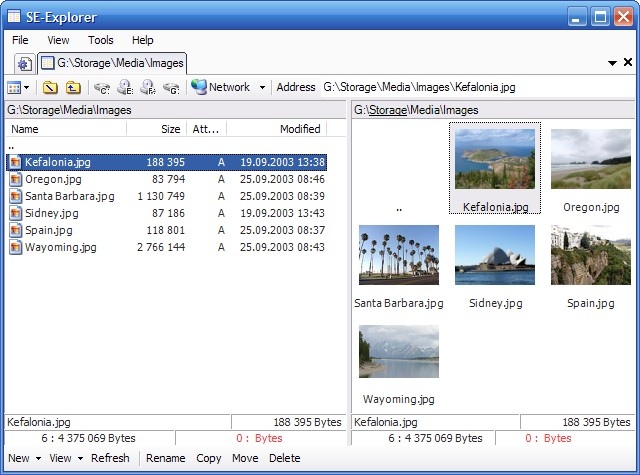
SE-Explorer is a free and powerful file manager for Windows and a complete portable replacement of standard Windows Explorer.
It has tabbed interface which made it possible to manipulate more than one directory or file view at the time, dual-panel file manager with two file windows side by side; new powerful search feature that allows to search media files, text in files, recently changed documents, files by tags, resources; new embedded size scanner that allows you to view disks summary, folders size, file types, size and extentions info and top largest files, powerfull file compare tool. Moreover SE-Explorer offers lots of build-in viewers:
Media player for audio, video and flash files: MP3, AVI, DIVX, MPEG, WMV, SWF, MOV, DV, DVR-MS, etc. FLV files are supported!
Picture viewer for PSD, PNG, JPEG, TIFF, PCX, TGA, etc.
DLL Inspector component. It has embedded resource view, object browser and dependencies walker for EXE, DLL and OCX files.
Archive explorer for ZIP, RAR, ISO, MSI, CAB, etc.
Resource view for executable files and icon libraries.
DOC, WRI, PDF, DjVu, Html Help and RTF document view.
Text viewer with syntax highlighting.
Folder comparison tool.
Text file comparison (difference) tool.
Hex viewer for binary files.
Web Browser for web and email files.
TTF Font files view.
XML structure view.
SE-Explorer is powerfull and easy tool which you can use everywhere - just copy application executable file to your USB flash drive and work with program on any PC.
About SE-Explorer
This File & Disk Management program is available in English. It was last updated on 29 September, 2026. SE-Explorer is compatible with the following operating systems: Windows.
The company that develops SE-Explorer is SE-SOFT.COM. The latest version released by its developer is 1.31.1. This version was rated by 1 users of our site and has an average rating of 4.0.
The download we have available for SE-Explorer has a file size of 2.1 MB. Just click the green Download button above to start the downloading process. The program is listed on our website since 2010-06-13 and was downloaded 249 times. We have already checked if the download link is safe, however for your own protection we recommend that you scan the downloaded software with your antivirus. Your antivirus may detect the SE-Explorer as malware if the download link is broken.
How to install SE-Explorer on your Windows device:
- Click on the Download button on our website. This will start the download from the website of the developer.
- Once the SE-Explorer is downloaded click on it to start the setup process (assuming you are on a desktop computer).
- When the installation is finished you should be able to see and run the program.
Program Details
System requirements
Download information
Pricing
Version History
version 1.31.1
posted on 2010-06-13
Compare folders, including subfolders and compare files by content; Small interface changes.
version 0.0.25.500
posted on 2009-01-11
Added resource browser for EXE, OCX and DLL files;
Added viewer for ICO, ICL and Thumbs.DB image libraries;
Build-in XML viewer is improved;
Many interface improvements are done
